S Pen Pro


Gallery popup


{{upgradeResult.displayModelName}}
{{upgradeResult.discountText1}}
{{upgradeResult.description1}}
{{upgradeResult.description2}}
{{offerFinance.title}}
{{offerFinance.learnMoreCta.text}}{{offerFinance.description}}
{{galaxyForeverResult.displayModelName}}
{{galaxyForeverResult.discountText1}}
{{galaxyForeverResult.description1}}
{{galaxyForeverResult.description2}}
选择您的边框颜色
画框为赠品,支付时金额立减
选择您的外壳颜色
可定制外壳需单独购买
-
{{item.name}}
开售提醒
现代风格
-
{{item.name}}
开售提醒
楔形风格
-
{{item.name}}
开售提醒
外壳颜色
-
{{item.name}}
开售提醒
边框风格
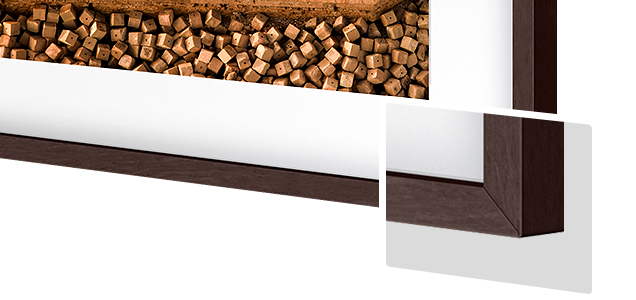
- 现代风格
边框采用磁吸设计,轻轻一扣便能精准安装。现在,您可随意切换不同风格。
边框风格
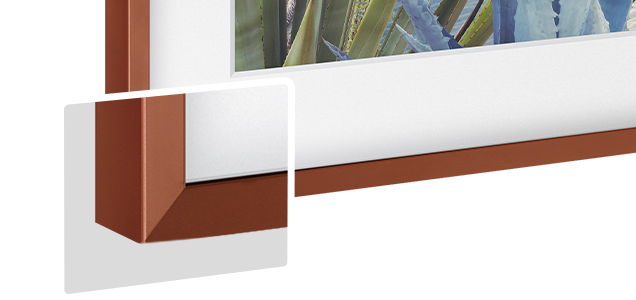
- 楔形风格
新楔形风格边框设计,其内侧边缘采用优雅的45度斜切处理。
{{tradeIn.title}}
{{tradeIn.learnMoreCta.text}}{{tradeIn.description}}
旧机估值已添加
-
{{item.displayModelName}} {{item.discountText1}} {{item.discountText2}}
{{tradeInResult.totalTicketMoneyText}}
旧机抵扣金额最终将以实际评估值为准
Dealer stock quantity
You can check the stock quantity for each region
Please select city
{{assuredBuyBack.title}}
{{newAssuredBuyBack.title}}
{{newAssuredBuyBack.learnMoreCta.text}}{{newAssuredBuyBack.description}}
Please select Samsung Assured Buyback or no coverage
{{warrantyResult.displayModelName}}
{{warrantyResult.discountText1}}
{{warrantyResult.description1}}
{{warrantyVdResult.title}}
{{warrantyVdResult.priceDisplay}}
{{delivery.headline}}
{{delivery.errorMessage}}
{{deliveryResult.priorityText}}
{{deliveryResult.mainText}}
{{deliveryResult.subText}}
Standard installation charges may apply.Click here for more details.
{{deliveryResult.decText}}
{{item.disclaimer}}
{{tariffOptionResult.displayModelName}}
{{tariffOptionResult.discountText1}}
{{tariffOptionResult.description1}}
{{tariffOptionResult.description2}}
{{tariffOptionResult.description}}
{{tariffOptionResult.price}}
{{tariffOptionResult.disclaimer}}
{{embedAddon.title}}
{{embedAddon.description}}
-
{{item.name}}
{{item.modelCode}}
{{item.description}}
{{item.finalPrice}}
{{item.originalPrice}}{{item.savePrice}} 开售提醒
-
{{item.name}}
{{item.modelCode}}
{{item.description}}
- {{item.dotList1}}
- {{item.dotList2}}
- {{item.dotList3}}
{{item.finalPrice}}
{{item.originalPrice}}{{item.savePrice}} 开售提醒
{{message.item.tcCTAText}}
{{message.item.periodText}}
特征
用Samsung Galaxy产品实现跨设备书写
S Pen Pro可以轻松连接到Samsung Galaxy设备,让您可以根据需要在不同的屏幕上做笔记,甚至可以轻松使用隔空操作功能。连接可在您的不同设备之间无缝切换——您只需按下S Pen触控笔上的按钮即可通过蓝牙进行连接。


*兼容支持 S Pen Pro的Samsung Galaxy 智能手机、平板电脑和 个人电脑。互联设备都必须登录到同一个三星账号。
*隔空操作功能仅适用于支持Samsung One UI 3.1或更高版本的 Galaxy Z Fold3 5G、Galaxy S21 Ultra 5G、 Galaxy Note20 5G、 Galaxy Note20 Ultra 5G、Galaxy Note10、 Galaxy Note10+ 5G、Galaxy Tab S7+、 Galaxy Tab S7、 Galaxy Tab S7 FE和Galaxy Tab S6。
*S Pen Pro 需要充电和配对之后才能使用隔空操作功能。
让您的手机、平板电脑和笔记本电脑共享信息
得益于S Pen Pro 的内置蓝牙连接,使用截图编写功能现在可以将您的剪报带到另一台设备上。您可以选择和收集有趣的内容并加以保存,然后在另一台设备的屏幕上再次显示它们,让分享变得超级简单。


*要使用截图编写功能进行共享,共享设备必须登录同一个三星账号,连接到同一个 Wi-Fi 网络,并开启蓝牙和共享设备以及该功能,才能共享并继续使用。
超长续航时间
随时记下灵感并勾勒出想法,而不必担心S Pen Pro的续航能力。S Pen Pro 可通过 USB Type-C 接口轻松充电,一次充满电后可带来长达约 16 天的电池续航时间。


*基于三星实验室内部测试。通过配对 Galaxy S21 Ultra 5G来测试 S Pen Pro 的电池寿命。实际电池续航时间可能因网络环境、S Pen Pro 使用的功能和应用程序以及其他因素不同而异。
*建议使用三星充电线和充电器以获得良好性能。
*充电线和充电器需单独购买。
规格参数
-
功能
S Pen书写,遥控和手势控制,S Pen查找,设备切换
-
尺寸 (宽x高x深)
9.5 x 171.04 x 9.14 mm
-
重量
13.8 g
-
兼容型号
隔空操作兼容性(Galaxy Z Fold3 5G, S21 Ultra 5G, Note20 5G/Ultra 5G, Note10, Note10+ 5G, Tab S7+, Tab S7, Tab S7 FE, Tab S6 支持One UI 3.1 或更高版本). 书写兼容性(Galaxy Z Fold3 5G, S21 Ultra 5G, Note系列, Tab S7 FE, Tab S7/7+, Tab S6 Lite, Tab S6, Tab S4, Tab S3,Tab Active2, Tab Active, Tab A 8.0 2019 with S Pen, Tab A 10.1 2016 with S Pen, Tab A 9.7 with S Pen, Tab A 8.0 2015 with S Pen, Note Pro - 12.2, Note 8.0, Note 10.1 2012/2014, Galaxy Book Flex S Pen, Notebook 7 spin, Notebook 9 Pen, Notebook 9 Pro)
-
电池状态指示
红色/绿色
-
额定能力
30 mAh
-
类型
锂离子聚合物
-
充电方法
Type-C
-
黑色
商品评价
全部评价(0)
使用者手册与下载
解决方案和提示